Guide · Gangnam Style Dance
How to Make a Gangnam Style Dance AI Video
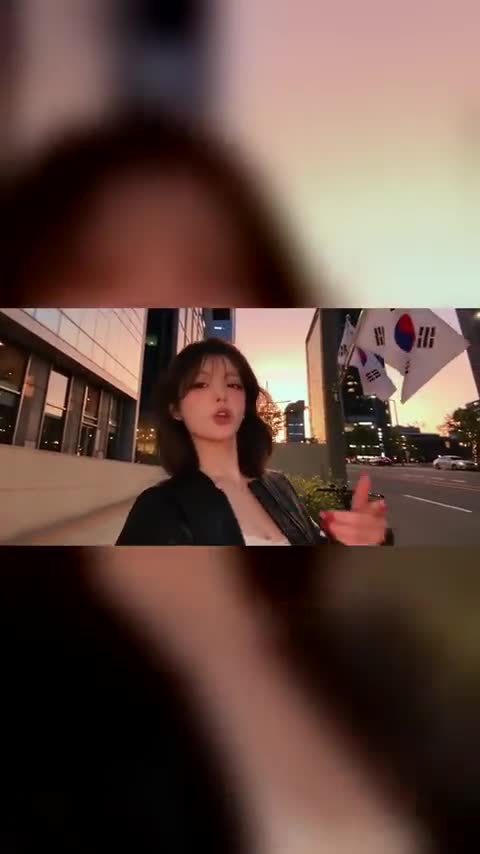
A Gangnam Style Dance AI video puts your face on the middle friend of a sunset selfie reel: three friends share one phone on a city sidewalk and take turns singing and dancing to the lens. Upload one sharp, front-facing photo, pay for that one clip with just your email, and get a vertical MP4 of about 15 seconds with the original trend sound.
 Gangnam Style Dance1 photo · About 15 s, 9:16 · Original trend sound includedMake my video
What the clip should look like
A Gangnam Style Dance AI video follows a handheld selfie reel set to PSY's 2012 hit. It is shot at sunset on a sidewalk between glass towers, with flags on tall poles behind. The shots run in a fixed order:
- A group selfie: three friends side by side on the sidewalk.
- The middle friend alone, singing straight to the lens.
- The other two take turns, one by the road and one on a side street.
- The middle friend comes back, close to the camera, to end the reel.
Your photo becomes the middle friend in the black leather jacket, the one who opens the solo shots and closes the reel. The other two friends and the street stay as in the example, which is itself AI-made, so no real people appear in it. For the song's long history on TikTok, read what the Gangnam Style Dance trend is.
How to choose the photo
You need one photo of one face: you, a friend or a pet. The middle friend gets the close-ups, so the face carries the clip.
- Front-facing. Looking at the camera, like a selfie.
- Sharp, in good, even light. The face is large in the finished clip, so a blurry or tiny face shows.
- One subject only. Group photos do not work.
- No sunglasses, masks or heavy filters.
- A warm, natural photo fits best. The reel is lit by a low sun, so an outdoor daylight photo blends in more easily than a flash photo in a dark room.
Only use a photo of an adult who agreed to appear in the clip, or of your own pet.
Make it on Trend Remake in four steps
- Choose the meme. Open the Gangnam Style Dance AI page and tap Make my Gangnam Style Dance video, or go straight to the order page with Gangnam Style Dance picked.
- Upload your photo. Add the one photo you chose.
- Confirm. Check the photo and the meme. There is no sign-up; you only give your email.
- Pay and get the clip. Pay for that one clip by card, Apple Pay or Google Pay: $9.90 per clip, first clip $6.99. The clip is usually ready within 30 minutes and stays on the site for 7 days, so save it to your phone.
You get an MP4 in 9:16, about 15 seconds long, at 720p. There is no subscription; credit packs are only for repeat buyers.
Common reasons a clip comes out wrong
- The face looks a little off in the close-up. The model rebuilds the face from your photo, and the last shot is close to the lens, so any blur in the photo shows there first. Use the sharpest photo you have. A delivered clip that only looks a little different from you is not refunded.
- The face is clearly someone else. Write to hello@trendremake.com with your order id and the clip is reviewed by hand.
- The wrong face was picked up. This happens with group photos. Use a photo with one subject.
- The eyes look odd. Sunglasses, masks and strong filters hide them. Use a plain photo.
- The clip never arrives. If it fails, the photo or trend is rejected, or nothing is delivered within 30 minutes of your order, the payment for that clip is refunded, to your card or back to your credits. A failed clip is not retried on another model.
Sound and captions for TikTok and Reels
The clip comes with the original trend sound. The video is made from your photo first, then that sound is laid under it, so it is ready to post. The sound belongs to its creators and is included for personal sharing only, and each platform's music rules apply to what you post.
For the caption, lean on the friends-reel feel. Tag the two friends you would have filmed it with, or write something like "We said we'd film it this weekend. I didn't wait." The chorus line "Oppan Gangnam Style" works as a short caption on its own.
The clip is AI-generated, so say so when you post, with the platform's AI label or a line in the caption.
Trend Remake is not affiliated with PSY or the song's label.
Read next: What is the Gangnam Style Dance trend?
FAQ
Which person in the reel becomes me?
The friend in the middle in the black leather jacket. That friend opens the group shot, gets the first solo shot singing to the lens and closes the reel up close.
Can I put my two friends in the clip too?
No. This template takes one photo for the middle friend; the other two friends and the street stay as in the example.
Can I use a photo of my pet?
Yes. One clear, front-facing photo of your pet works, one subject per photo.
How long is the Gangnam Style Dance AI video?
About 15 seconds, vertical 9:16, at 720p, with the original trend sound.