Guide · Stop Sign
How to Make a Stop Sign AI Video From One Photo
A Stop Sign AI video puts one face, yours or your pet's, in the driver's seat at a night traffic stop, staring back at the window with a baffled look. Upload one sharp, front-facing photo, pay for that one clip with just your email, and get a vertical MP4 of about 10 seconds with the original trend sound, usually within 30 minutes.
 Stop Sign1 photo · About 10 s, 9:16 · Original trend sound includedMake my video
What the clip should look like
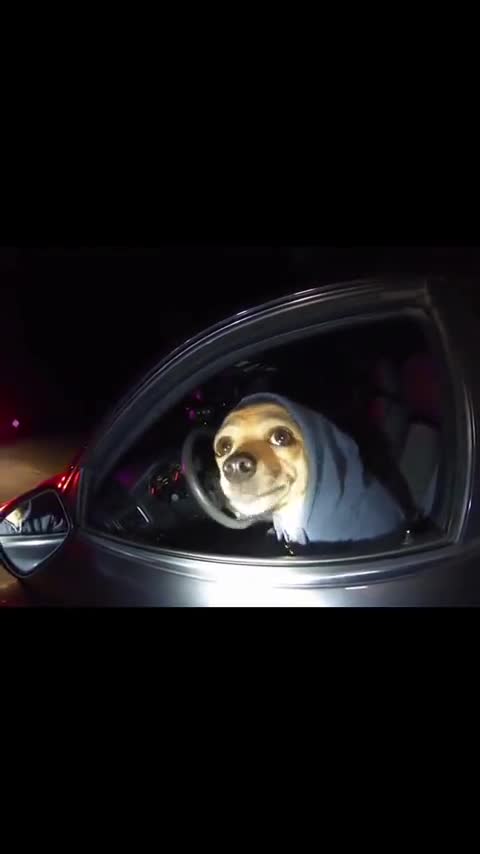
A Stop Sign AI video recreates the "What stop sign?" moment as a short vertical clip. It is night. The camera walks up to a dark car with police lights far behind it. A flashlight lights the door, and the driver looks up at the open window, stares back, then grins and shrugs. The officer never appears on screen, so the face from your photo is the only face in the clip.
Our example follows a pet version: a Chihuahua in a grey hoodie at the wheel. Your photo takes that seat, in the same hoodie, with the same camera moves and the same timing. The whole joke sits on one thing, the innocent, baffled look, so the face in your photo matters more than anything else. If you want the backstory first, read what the Stop Sign trend is.
How to choose the photo
You need one photo of one face. A person works, and so does a dog or a cat. Pick it before you open the order page, because the photo decides how the clip turns out.
- Front-facing. The face looks at the camera, not off to the side.
- Sharp, in good, even light. The face is large in the finished clip, so blur, dark shadows or a tiny face will show.
- One subject only. Group photos do not work. Pick a photo with just the one person or pet.
- No sunglasses, masks or heavy filters. The eyes carry the baffled look, so keep them visible.
- For a pet, the whole head. Both ears and the full face in frame give the best result.
Only use a photo of an adult who agreed to appear in the clip, or of your own pet.
Make it on Trend Remake in four steps
- Choose the meme. Open the Stop Sign AI video page and tap Make my Stop Sign video, or go straight to the order page with Stop Sign picked.
- Upload your photo. Add the one photo you chose from your camera roll.
- Confirm. Check that it is the right photo and the right meme. There is no sign-up; you only give your email.
- Pay and get the clip. Pay for that one clip by card, Apple Pay or Google Pay: $9.90 per clip, first clip $6.99. The clip is usually ready within 30 minutes and stays on the site for 7 days, so save it to your phone once it arrives.
You get an MP4 in 9:16, about 10 seconds long, at 720p. There is no subscription. Credit packs exist for repeat buyers, but you never need one for a single clip.
Common reasons a clip comes out wrong
Most problems trace back to the photo. Here is what usually goes wrong and what to do about it.
- The face looks a little off. The model rebuilds the face from your photo, so a soft or dark photo gives a softer likeness. A clearer, front-facing photo is the fix. A delivered clip that only looks a little different from you is not refunded.
- The face is clearly someone else. Write to hello@trendremake.com with your order id and the clip is reviewed by hand.
- The wrong face was picked up. This happens with group photos. Use a photo with one subject.
- The look feels flat. Sunglasses, masks and strong filters hide the eyes. Use a plain photo.
- The clip never arrives. If it fails, the photo or trend is rejected, or nothing is delivered within 30 minutes of your order, the payment for that clip is refunded, to your card or back to your credits. A failed clip is not retried on another model.
Sound and captions for TikTok and Reels
The clip comes with the original trend sound. The video is made from your photo first, then that sound is laid under it, so you can post it as it is. The sound belongs to its creators and is included for personal sharing only, and each platform's music rules apply to what you post. On TikTok the line has also lived on as its own sound since July 2025, when people began building videos around it, so you can swap in the app's version if you prefer.
Keep the caption short and let the look do the work. Quoting the line fits the joke: "Stop sign? What stop sign?" A POV line works too, such as "POV: you swear there was no sign." If it is your pet, use their name: "Biscuit got pulled over again."
The clip is AI-generated, so say so when you post, with the platform's AI label or a line in the caption.
Trend Remake is not affiliated with the people in the original footage or with any police department.
Read next: What is the Stop Sign trend?
FAQ
Can I make a Stop Sign AI video of my dog or cat?
Yes. Use one clear photo with the whole head and both ears visible, and your pet takes the driver's seat in the grey hoodie.
How long is the Stop Sign AI video?
About 10 seconds, vertical 9:16, at 720p, with the original trend sound.
Do I need an account to order?
No. There is no sign-up. You pay for the one clip at checkout with just your email.
Does the officer appear in my clip?
No. The camera stays at the driver's window and only the flashlight reaches the door, so the face from your photo is the only one on screen.