Guide · Lil Yachty Walkout
How to Make a Lil Yachty Walkout AI Video
A Lil Yachty Walkout AI video needs one sharp, front-facing photo. On Trend Remake you choose the walkout, upload the photo, confirm and pay with just your email, and the 10-second vertical clip with the original trend sound is usually ready within 30 minutes.
 Lil Yachty Walkout1 photo · About 10 s, 9:16 · Original trend sound includedMake my video
What the finished clip looks like
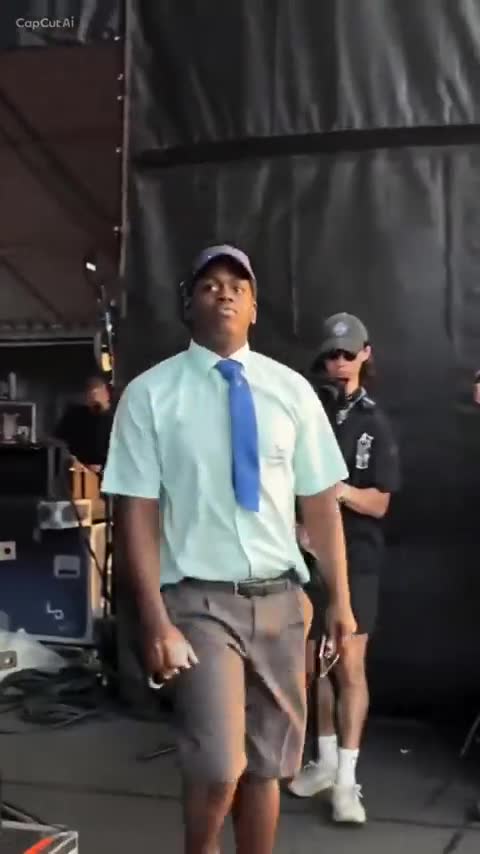
A Lil Yachty Walkout AI video puts your face on the performer in one of the best-known festival entrances online. The original comes from Lil Yachty's set at the Lyrical Lemonade Summer Smash festival in August 2021. In the remake, the camera, the runway and the crowd stay the same. Only the person walking changes.
Our template follows one continuous handheld shot. A performer in a cap, shirt and tie walks out from a dark backstage area with the mic in hand. He raises the mic high, heads past the speakers and then high-steps down a long runway toward a huge crowd under a sunset sky. There are no words and no dance moves. The confidence of the walk is the joke.
What you get is an MP4, about 10 seconds long, 9:16 vertical, at 720p, with the original trend sound already laid under it. The full product details are on the Lil Yachty Walkout AI video page.
Pick the right photo
The walk itself comes from the reference clip, so you do not need a full-body or stage photo. What matters is the face. It is large in the finished clip, so a blurry or tiny face shows.
- One photo, one face. You, a friend or a pet. Group photos do not work.
- Front-facing. Look at the camera, or close to it. A face turned far to the side gives the model less to work with.
- Even light. Daylight from a window is better than a lamp behind you or a hard shadow across half the face.
- Nothing over the face. No sunglasses, masks or heavy filters.
- The original file. Pick the photo from your camera roll, not a screenshot or a saved thumbnail.
Upload a person only if they agreed to appear.
Make it on Trend Remake in four steps
- Choose the meme. Open the order page for the walkout in Safari or Chrome and pick Lil Yachty Walkout if it is not already chosen.
- Upload your photo. Use one sharp, front-facing photo of one face.
- Confirm. Check that the photo you see is the one you want on the runway.
- Pay and get the clip. It costs $9.90 per clip, first clip $6.99. You pay for this one clip with just your email, by Apple Pay, Google Pay or card. There is no sign-up and no subscription. The clip is usually ready within 30 minutes.
The finished clip stays on the site for 7 days, so save it to your phone once it is ready.
Why a clip goes wrong
Most problems come from the photo, not the walk.
- The face does not look like you. The model rebuilds the face from one picture, so a soft, dark or tilted photo drifts. Try a sharper, front-facing one.
- The photo is refused. It is too small or too narrow. Use the full-size original.
- Two faces in the picture. The model may pick the wrong one. Crop to one person.
- Nothing after 30 minutes. A clip still not ready after 30 minutes counts as failed, and the payment for that clip is refunded. The same goes for a clip that fails or a photo that is rejected.
If the face is clearly not the person or pet in your photo, write to us with the order id and we review it by hand. A clip that only looks a little different from you is not refunded.
Post it to TikTok or Reels
The clip is already vertical, so it fits TikTok, Reels and Shorts without cropping. The original trend sound is included for personal sharing. It still belongs to its creators, and each platform's music rules apply to what you post. If the app mutes it, add the sound from that app's own library.
The walkout has long been used as a reaction to a big entrance or a comeback, so the caption does most of the work. Write the moment you are walking into: the first day back at the gym, the office on a Friday, the family dinner after good news. Keep it short and let the walk land.
The clip is AI-generated, so say so when you post. If you want the backstory first, read what the Lil Yachty Walkout trend is.
Trend Remake is not affiliated with Lil Yachty, Lyrical Lemonade or the Summer Smash festival.
Read next: What is the Lil Yachty Walkout trend?
FAQ
Do I need a full-body photo for the walkout?
No. The walk, the runway and the crowd come from the reference clip. A clear, front-facing photo of your face is what counts.
Can I use a photo of my dog or cat?
Yes. One photo of one face works for you, a friend or a pet, as long as the face is sharp, front-facing and in good light.
How long does the clip take?
Usually within 30 minutes. If it is still not ready after 30 minutes, it counts as failed and the payment for that clip is refunded.
Can I make the clip longer?
No. The walkout clip is about 10 seconds, vertical 9:16, at 720p.